A guitar solo goes in. Notation, tab and playable fingerings come out in a Guitar Pro file — with an honest, measured account of how much of it to trust.
This is a real transcription by the pipeline — an eight-bar bebop line over a ii–V–I in F, no human help. Every glowing bar below is a note the machine wrote down; the brighter the bar, the surer it was. Then flip the switch and hear its reading played back — same solo, as the machine understood it.
The recording — the solo line the machine was given. Click anywhere on the roll to jump.
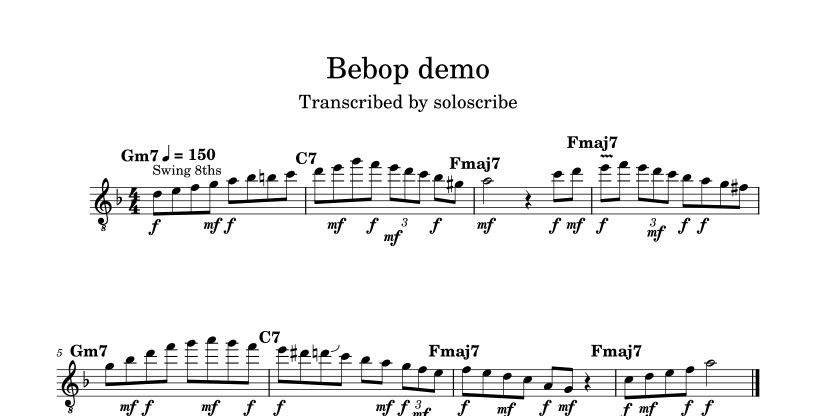
Straight from the pipeline: F major, swing marked the way real jazz charts mark it, chords over the bars, triplets bracketed, fingerings chosen. Rendered by MuseScore from the very .gp5 file you can download below.
Automatic transcription tools exist, and on real music they all make mistakes — the honest ones say 80–95% of notes on a clear recording, and none of them tell you which notes they got wrong. You get a chart that is some-percent nonsense with no map of which percent.
So the interesting problem was never "audio in, tab out". It was the question a musician asks next: can't you check your work against the original? That question is this tool. After transcribing, Big Ears plays its own transcription back, lines it up against your recording, scores the agreement bar by bar, and hands you a verdict it is prepared to defend — including "medium" or "low" when that is the truth. Your cleanup time goes exactly where it is needed, with the recording in your ears.
A neural stem-separator lifts the guitar out of the band — and checks the isolation didn't swallow notes. If it did, it works from the original instead. In this very demo, it caught exactly that and switched.
A transcription model reads pitches; a second, stricter listener cross-checks octaves, strips overtone ghosts and marks vibrato and bends.
Tempo is tracked through the band's drift. Swung quavers are notated straight and marked Swing, as proper jazz charts do; genuine triplets keep their brackets.
A dynamic-programming engine picks string and fret the way a player would — staying in position rather than leaping about the neck.
A genuine .gp5, byte-for-byte valid — verified by independent readers — with your chord chart printed over the bars.
It resynthesizes the score, aligns it to your recording, and grades itself bar by bar. The grade is honest — it is allowed to say "low".
On synthesized test solos where every note is known in advance — a swung bebop line, a blues phrase, a syncopated funk line, with and without a backing band — the full pipeline scores:
| Material | Clean | With backing | Backing + noise |
|---|---|---|---|
| Bebop, swung (150 bpm) | F1 0.99 | 0.97 | 0.97 |
| Blues (92 bpm) | 0.98 | 0.93 | 0.93 |
| Funk, 16ths (104 bpm) | 0.95 | 0.89 | 0.89 |
Full methodology and everything it can't do: VALIDATION.md. Real recordings land below synthetic numbers — which is what the per-run report is for.
Open Big Ears on the web — upload the clip, get the Guitar Pro file and the report back. The full works, including guitar isolation (which takes a few patient minutes on the free computer it runs on). If it has been asleep, the first visit takes a minute to wake up.
On your own Mac it does everything, at full speed, with nothing uploaded anywhere. Installing takes about fifteen minutes, most of it waiting — step-by-step instructions below.
You need a Mac with an Apple chip — any MacBook, iMac or Mac mini from about 2021 onwards (it says "Apple M1/M2/M3/M4" under the apple menu → About This Mac) — and around 3 GB of free space. It was built and tested on exactly this kind of machine; older Intel Macs are untested. Nothing here can break anything: it all lives in one folder you can drag to the bin.
bigears-main. Drag it somewhere sensible,
like your home folder.⌘ space, type "Terminal", press return) and paste
these two lines, pressing return after each:cd ~/bigears-mainbash bin/install.shbin folder (or paste the start line the installer prints).
The app opens in your browser, and from then on it is always two
clicks away.Everything runs on your own machine, so there is no uploading, no queue, and nothing to wake up. Measured on the Mac it was built on: working out the notes takes about five seconds per half-minute of audio, and a complete run on a short clip — notes, beat, fingerings, the Guitar Pro file and the self-check report — comes back in well under a minute. The guitar-isolation step (for clips where the band drowns the guitar) uses the Mac's graphics cores, where a free web computer has none. And since the recording never leaves the machine, it is as private as humming to yourself.
If anything refuses to open with a message about an "unidentified developer", that is the Mac being cautious about downloaded files — the installer clears it for you, so run step 2 first and it will not come up.